What Is MIDI-A Primer

•••Originally published by Alamo Music Center•••
What is MIDI?
When I taught at the University of Texas in San Antonio, my students would always ask why they couldn’t hear their MIDI, and the answer is rather simple. MIDI can’t be heard as it doesn’t transmit sound, just messages. MIDI is actually a language or protocol that was developed that would ultimately tie musical instruments and other equipment together for the common purpose of performing, recording, and playing back musical performances. So if you can’t hear your MIDI, maybe this brief article can give a bit of guidance!
Musical Instrument Digital Interface
If you thought that MIDI was just a strange word that’s fun to say, you’ve hit the nail on the head, but there’s more to it. MIDI is an acronym that expands into “Musical Instrument Digital Interface”, and that’s exactly what it is. Through a series of inputs, outputs, and throughputs, one is able to connect sometimes disparate instruments together so they can speak with each other and communicate in a common language. Many times, a computer that’s paired to a MIDI interface via USB or a controller/device that transmits MIDI over USB will also be in the mix.
There is no shortage of MIDI controllers today, but the most common of the lot is the piano keyboard. Mini keys, slim keys, 25-48-61-76-88 keys, weighted, capacitance controllers… there is a veritable wealth of options and combinations in the piano keyboard universe! The piano keyboard paradigm has been in transition for some time, though, and while it’s still the most common, there are a plethora of others to take into account. Drum pads, grid controllers, gloves, gaming system controllers, drum triggers, and more have flooded the market in recent years, making the search for the perfect controller more daunting for some, and an addiction for many.
Musical Messages
So what exactly is MIDI? MIDI is a series of messages that are either played in real time and transmitted through inputs, outputs and throughputs, or played back from a sequencer via the aforementioned conduits . The most common of these messages are going to be note on/off and velocity. The note on message quite simply sends a message the corresponding MIDI value is to be played when the key is pressed, while the note off message does the exact opposite. Another part of the note on/off message is the velocity at which the note is played and/or released. In the world of MIDI, velocity determines the amplitude of the sound that will be triggered which is informed by how hard the key is pressed. Velocity can also be used to change the timbre, attack, release, and countless other parameters of a sound or patch if the synthesizer, sound module, or software is capable.
Other common controls include: pitch bend, modulation, aftertouch and sustain. Most of these controls are going to be global or common, meaning that all notes that are being played will be effected in the same way. Like most rules, these can be broken by changing the way the control reacts or by merely turning it off. If MIDI is completely new to you, you’re probably wondering how the aforementioned controls let you manipulate the sound and performance, so I’m going to try to explain them as succinctly as possible.
Pitch bend – Allows the user to bend the pitch of all notes that are being played. Notes can can be pitched either up or down, and the range is usually definable. This is a physical controller (in most cases) that can be found on the left side of a keyboard. In most instances one will find a wheel or stick and sometimes a capacitance strip.
Modulation – This one is particularly fun! If you love vibrato or tremolo, this is usually the mechanism that will make either a reality. Can also be assigned or mapped to other parameters, but this also hinges on how deep you want to go. This also usually accompanies the pitch bend mechanism in the same form and they are most likely neighbors on the left side of the keyboard. Don’t’ be surprised if pitch bend and modulation are joined at the hip using the same controller on two different axes.
Aftertouch – Like modulation, but happens via an extra level of control in the keybed. Many keyboard controllers, and alternatives to the keyboard, have an extra level of control that can be engaged after the initial note is played. If you happen to press down with bit more force on the keyboard after the initial note has been played and there seems to be an extra level of give, that is most likely the aftertouch mechanism. While usually global, some controllers offer what is called poly-aftertouch, in which aftertouch can happen on individual notes. This is a bit more advanced, and can be wicked fun with certain specialty controllers!
MIDI Resolution
The original MIDI specification was introduced in 1982 and demonstrated at NAMM in 1983. It should be noted that the same specification is still in use today. Expertly designed and programmed from the onset, MIDI 1.0 has now been in use commercially since 1982. All the wonderful vintage MIDI gear from yesteryear will work with your favorite devices from today! The MIDI spec allows for 16 channels of communication both ways and generally has a resolution of 0-127 steps (7 bits). The resolution of pitch bend is bit different offering far greater resolution from 0-16383 steps (14 bits). Some of these rules can be broken with the use of MIDI interfaces (far more than 16 channels/multiple ins and outs) and for the advanced users, writing scripts in certain programming languages or patches in certain applications will also allow for rule-bending.
Connections and Communication
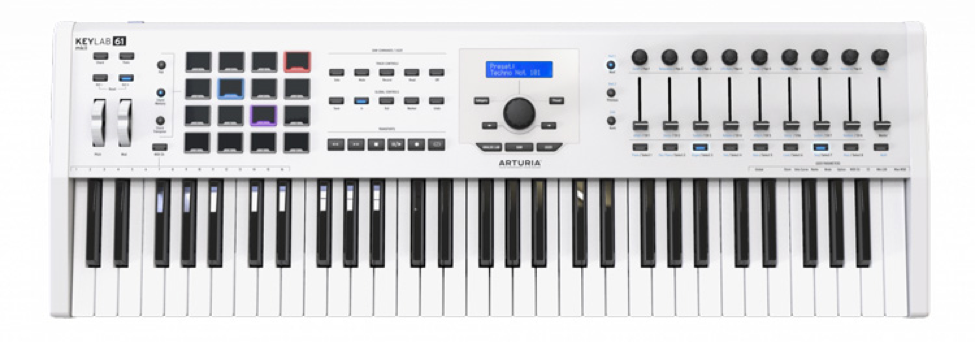
The most common connection today is a MIDI controller connected to a computer via USB, most commonly referred to as “MIDI over USB”. Most old pros are familiar with something a bit more archaic; the ubiquitous 5 pin DIN connection. If you’re new to the game, and currently have a controller that’s connected via USB, there’s a pretty good chance that your controller also facilitates the standard 5 pin connection. Just look at Arturia’s KeyLab MKII below and you will see what I mean.


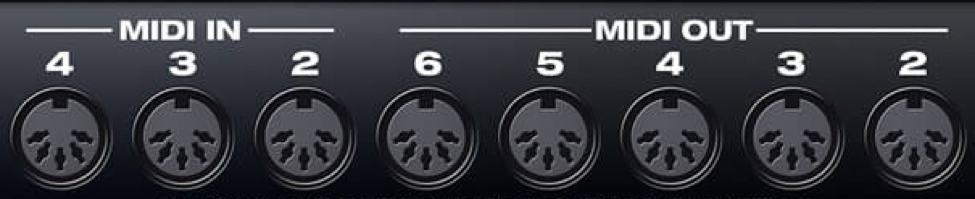
Standard 5 Pin DIN MIDI Ins and Outs
Arturia’s KeyLab connects to a computer via USB, but also incorporates the standard 5 pin in and out that allows you to connect to other MDI enabled devices that don’t employ USB connectivity. This is a huge plus, and for those of you that are scouring the vintage market for drum machines, rack synths, samplers, and other devices on the cheap, this will allow you to sequence vintage pieces using your current favorite DAW. The image below illustrates what a MIDI setup might look like today.
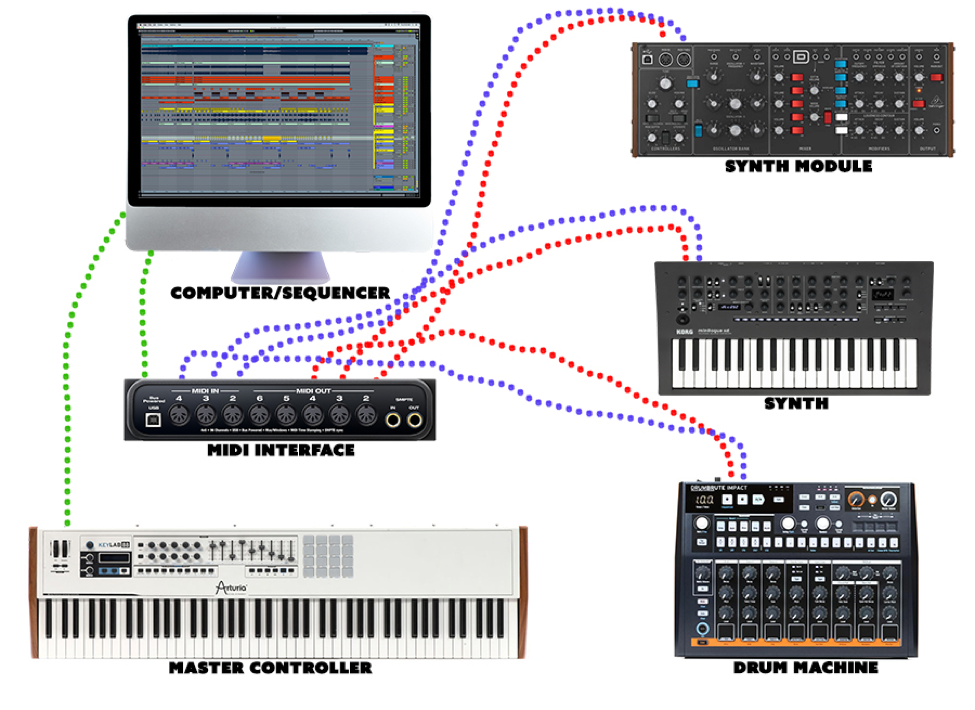
· Green dots: These are the USB connections from the master controller and MIDI interface to the computer. This allows for two-way communication with your favorite DAW and other devices in the setup above.
· Red dots: These are the connections from the MIDI outputs of the MIDI interface to the MIDI inputs of the synth module, synth and drum machine in the setup on the left. The MIDI outputs will send performance information, whether it be played in real time, or from the sequencer on the DAW to the MIDI inputs on the devices on the right. If connected properly, the devices on the right will play the corresponding note that is played on the master controller and/or sequencer.
· Blue dots: These are the MIDI connections from the outputs of the devices on the right to the inputs of the MIDI interface on the left. The devices on the right can also send MIDI information to the computer via the interface. Many devices/instruments have various continuous controllers (CC) that might send information that is recordable into a sequencer. Sweeping filters, effects, sustain, and more can be sent both from and to devices if the MIDI setup is functioning properly. Other parameters can be sent from these devices as well, such as system exclusive messages which can restore a synth or drum machine to a certain state for a project.
(Please note that in the example above, the MIDI interface is exactly that, it transmits MIDI, not audio. It should also be noted that many audio interfaces can act as a simple MIDI interface adding one in and one out, both of which are standard 5 pin connections.)
The setup above is not indicative of all setups!!! Many just employ a controller and a computer in their MIDI studio, while some might have a standalone sequencer, keyboard/synth, and drum machine that omits the computer altogether! Since MIDI is a common language, there are an infinite number of setups that can take place across thousands of instruments and other devices.
The Future of MIDI
MIDI is literally everywhere today. The amount of music applications that can be found on IOS and Android devices is staggering, and most utilize MIDI. Many controllers will work on these devices, and in some instances will even use the device as a power source. The MIDI 1.0 spec is and has been strong since 1982, however the 2.0 spec just saw its introduction at NAMM 2020 in Anaheim. All of the major operating systems currently support MIDI and the drivers and definitions for most instruments/devices already exist within said operating systems. The amount of specialty controllers that exist today is staggering, and many are customizable via MIDI, or when ordered, as in, made-to-order… killer!
Stay tuned for more!!!